
In This Article
What Is the TM.18 Form?
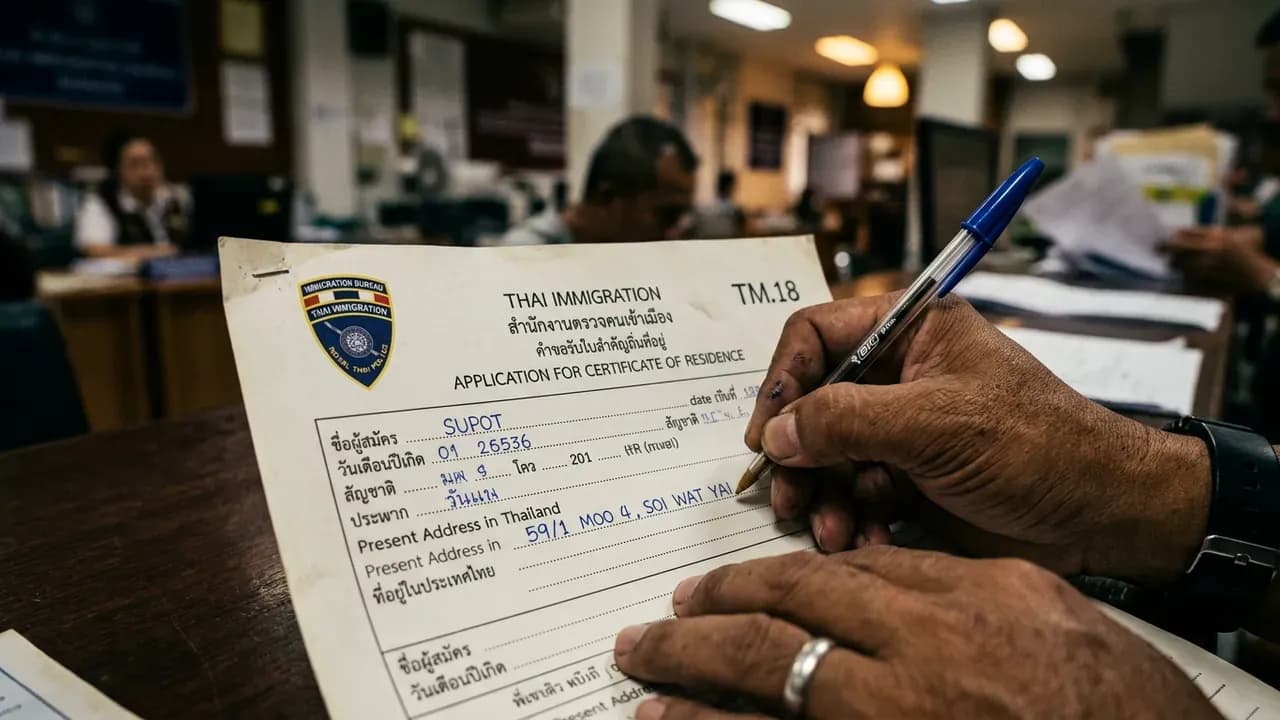
The TM.18 is the official application form for requesting a Certificate of Residence (TM.16) from the Thai Immigration Bureau — the proof-of-address letter covered end to end in our guide to the residence certificate in Thailand. It is a single-page document that you complete and submit along with your supporting documents. The form collects your personal information, passport and visa details, current residential address, and the purpose for which you need the certificate.
While the form itself is straightforward, errors and inconsistencies are one of the most common reasons for application delays. The most critical rule: every piece of information on the TM.18 must match your passport and TM.30 exactly. Understanding each field eliminates this risk.
Key facts about the TM.18
| Detail | Information |
|---|---|
| Official name | Application for Certificate of Residence |
| Form number | TM.18 |
| Pages | 1 page |
| Language | Thai and English |
| Fill out in | English (unless you write Thai fluently) |
| Resulting document | TM.16 Certificate of Residence |
Where to Download the TM.18 Form
Official sources
- Immigration Bureau public handbook for the TM.16 — PDF on immigration.go.th: it lists the TM.18 as the application form, the document set, the fee table and the three-working-day service standard.
- Blank application form — "Application Form Residence Certificate in Thailand" (PDF), hosted by the BOI's LTR visa unit. Our TM.16 form guide and TM.18 form guide carry the same links.
- At the Immigration office — blank forms are available at the information counter or in a rack near the entrance.
Tips for printing
- Use standard A4 paper
- Print at 100% scale — do not shrink to fit
- Some PDF versions allow you to type directly into fields before printing, which is recommended for legibility
- If typing, still sign the form by hand after printing
Tip: Fill out the form at home before your visit. This saves 10-15 minutes at the office and allows you to double-check details against your passport and TM.30 without the stress of a busy waiting room. Bring a blank spare copy as well, in case you need to start over.
Field-by-Field Instructions
Here is how to complete each section of the TM.18 form correctly:
Personal information
- Full name: Write your complete name exactly as it appears in your passport, including all middle names. Use BLOCK CAPITALS. Example: JOHN MICHAEL SMITH. Do not use nicknames, abbreviations, or different transliterations.
- Nationality: As stated in your passport. Example: BRITISH, AMERICAN, AUSTRALIAN, GERMAN, JAPANESE.
- Date of birth: Use DD/MM/YYYY format (Thai standard). Example: 15/03/1985. Note: this is day-first, not month-first as used in the US.
Passport and visa details
- Passport number: Exactly as printed on your passport. Include any letters.
- Visa type: Write the visa category from your sticker. Example: NON-IMMIGRANT B, NON-IMMIGRANT O, or LONG-TERM RESIDENT (LTR).
- Visa number: The reference number on your visa sticker or extension stamp.
- Date of most recent entry: The date stamped in your passport when you last entered Thailand. Use DD/MM/YYYY format.
Address
- Current address in Thailand: Your complete address including room/unit number, building name, house number, street name (including Soi), sub-district (Khwaeng or Tambon), district (Khet or Amphoe), province (Changwat or Krungthep Maha Nakhon for Bangkok), and postal code. This must match your TM.30 registration exactly.
Purpose and duration
- Purpose of certificate: Be specific. Good examples: "Application for Thai driving license at DLT," "Opening bank account at Bangkok Bank," "Vehicle registration at DLT." Avoid vague answers like "personal use."
- Period of residence: How long you have lived at the stated address. Example: "1 year and 6 months" or "Since January 2025."
Signature and date
- Sign using the same signature as in your passport
- Date using DD/MM/YYYY format
Common Mistakes That Cause Rejections
Based on our experience processing hundreds of applications, these are the most frequent TM.18 errors:
| Mistake | Why it causes rejection | How to avoid it |
|---|---|---|
| Name mismatch | Name differs from passport (nickname, abbreviated middle name, different transliteration) | Copy your name character-for-character from your passport |
| Address mismatch | Address written differently from TM.30 (different format, missing room number, different street name transliteration) | Copy the address exactly from your TM.30 receipt |
| Wrong date format | Using MM/DD/YYYY instead of DD/MM/YYYY | Thailand uses DD/MM/YYYY — always put the day first |
| Blank fields | Officer assumes form is incomplete | If a field does not apply, write "N/A" — never leave it empty |
| Unsigned form | Application invalid without signature | Sign before submitting. Use the same signature as your passport. |
| Pencil instead of pen | Pencil can be erased; not accepted | Use a blue or black ballpoint pen only |
| Illegible handwriting | Officer cannot read your information | Use BLOCK CAPITALS throughout. Or type the form before printing. |
| Vague purpose | "Personal use" does not tell the officer what you need it for | State the specific purpose: driving license, bank account, etc. |
Pro tip: Before submitting, place your passport open to the bio page next to the completed TM.18 and compare every field. Then compare the address against your TM.30 receipt. This 2-minute check prevents the most common rejection reasons.
Language, Ink, and Formatting Rules
Language
Fill out the form in English using BLOCK CAPITALS. The form has Thai field labels, but your answers should be in English unless you can write Thai fluently and your passport information is also registered in Thai (which it is not for most foreign nationals).Ink color
Use a blue or black ballpoint pen. Gel pens, markers, felt-tip pens, and pencils are not acceptable. Blue is generally preferred as it clearly distinguishes original writing from photocopied text.Corrections
If you make a mistake:- Draw a single line through the error
- Write the correction next to it
- Initial the change
- Do NOT use correction fluid (white-out or Liquid Paper)
- If the error is significant, start with a fresh form
Address formatting
Follow the Thai address format: room/unit number, then building/house number, street name (including Soi number), sub-district (Khwaeng in Bangkok / Tambon elsewhere), district (Khet in Bangkok / Amphoe elsewhere), province (Krungthep Maha Nakhon for Bangkok / Changwat for provinces), and postal code. This ordering may differ from your home country convention.Sample Completed TM.18 Form
Here is what a properly completed TM.18 looks like (example data):
| Field | Example Entry |
|---|---|
| Full Name | JOHN MICHAEL SMITH |
| Nationality | BRITISH |
| Date of Birth | 15/03/1985 |
| Passport Number | 987654321 |
| Visa Type | NON-IMMIGRANT B |
| Date of Entry | 10/01/2026 |
| Address | ROOM 1205, BUILDING A, THE RESIDENCE CONDOMINIUM, 123 SUKHUMVIT SOI 15, KHWAENG KHLONG TOEI NUEA, KHET WATTHANA, KRUNGTHEP MAHA NAKHON 10110 |
| Purpose | APPLICATION FOR THAI DRIVING LICENSE AT DLT |
| Period of Residence | 2 YEARS AND 3 MONTHS |
| Signature | [Passport signature] |
| Date | 10/03/2026 |
Key points in this example: Every field is completed (nothing blank). The name matches the passport exactly. The address matches the TM.30 record precisely. The date format is DD/MM/YYYY. The purpose is specific. This level of consistency is what Immigration officers look for.
Need help with your residence certificate?
Our team handles the entire process — document preparation, Immigration visit, and certificate collection.
Frequently Asked Questions
Yes, blank forms are available at every Immigration office. However, filling it out at home saves 10-15 minutes and reduces errors that can happen under the pressure of a busy office with people waiting behind you.
No. The TM.30 is filed by your landlord to register your address with Immigration. The TM.18 is the form you fill out to request a residence certificate. They serve different purposes but both relate to your address.
Yes. Many PDF versions of the TM.18 allow you to type directly into the fields before printing. This is preferred as it eliminates legibility issues. However, you must still sign the form by hand with a pen after printing.
Be specific about why you need the certificate. Common examples: 'Application for Thai driving license at DLT,' 'Opening bank account at Kasikorn Bank,' 'Vehicle registration at DLT,' or 'Condominium purchase.' Avoid writing just 'personal use' as officers prefer clear, specific purposes.
Yes. Each application requires a freshly completed TM.18 form. You cannot reuse a previously submitted form, even if your details are unchanged. Keep a blank copy available for future applications.
Write smaller to fit within the designated area. Do not extend writing outside the form boundaries. You can abbreviate common terms like Soi, Rd, Bldg, and Condo, but keep full sub-district, district, and province names intact as these are critical for verification.
Yes. You can write multiple purposes such as 'Application for car driving license and motorcycle driving license at DLT.' This is especially useful at Bangkok Chaeng Watthana where certificates may be purpose-specific. Some offices may still issue separate certificates for each purpose.